
5 Best Pin Inspector Alternatives For Pinterest Keyword Research (2025)

If you’ve been using Pin Inspector for your Pinterest keyword research, you already know how important it is to work with real search data instead of guessing.
But maybe the desktop software feels clunky, you want something web‑based, or you’re just not seeing the features and support you hoped for. It’s completely normal to look around for alternatives once you’ve “outgrown” your first tool.
This guide walks through five practical Pin Inspector Alternatives. The goal is to help you understand what else is available so you can choose a tool that fits your budget, workflow, and stage of business.
Pin Inspector Alternatives – Quick summary
If you’re in a hurry, here’s the short version:
- Best overall Pin Inspector alternative: Pinsearch – modern, web‑based Pinterest keyword research with strong organization and competitor insights.
- Best for rank tracking and keyword data: Pinclicks – keyword rank tracking, interest keywords, and detailed pin stats for data‑driven marketers.
- Best for scheduling + basic keywords: Tailwind – ideal if you want pin scheduling and simple keyword help in one tool.
- Best one‑time multi‑platform option: Keysearch – covers Pinterest plus other platforms with an affordable pricing plan.
- Best for beginners who want something simple: Pindodo – a browser extension focused on quick keyword and hashtag ideas.
If you want web‑based research and better organization than Pin Inspector, start by looking at Pinsearch or PinClicks. If you care more about scheduling than data, Tailwind may be enough.
1. Pinsearch – Best overall Pin Inspector Alternative
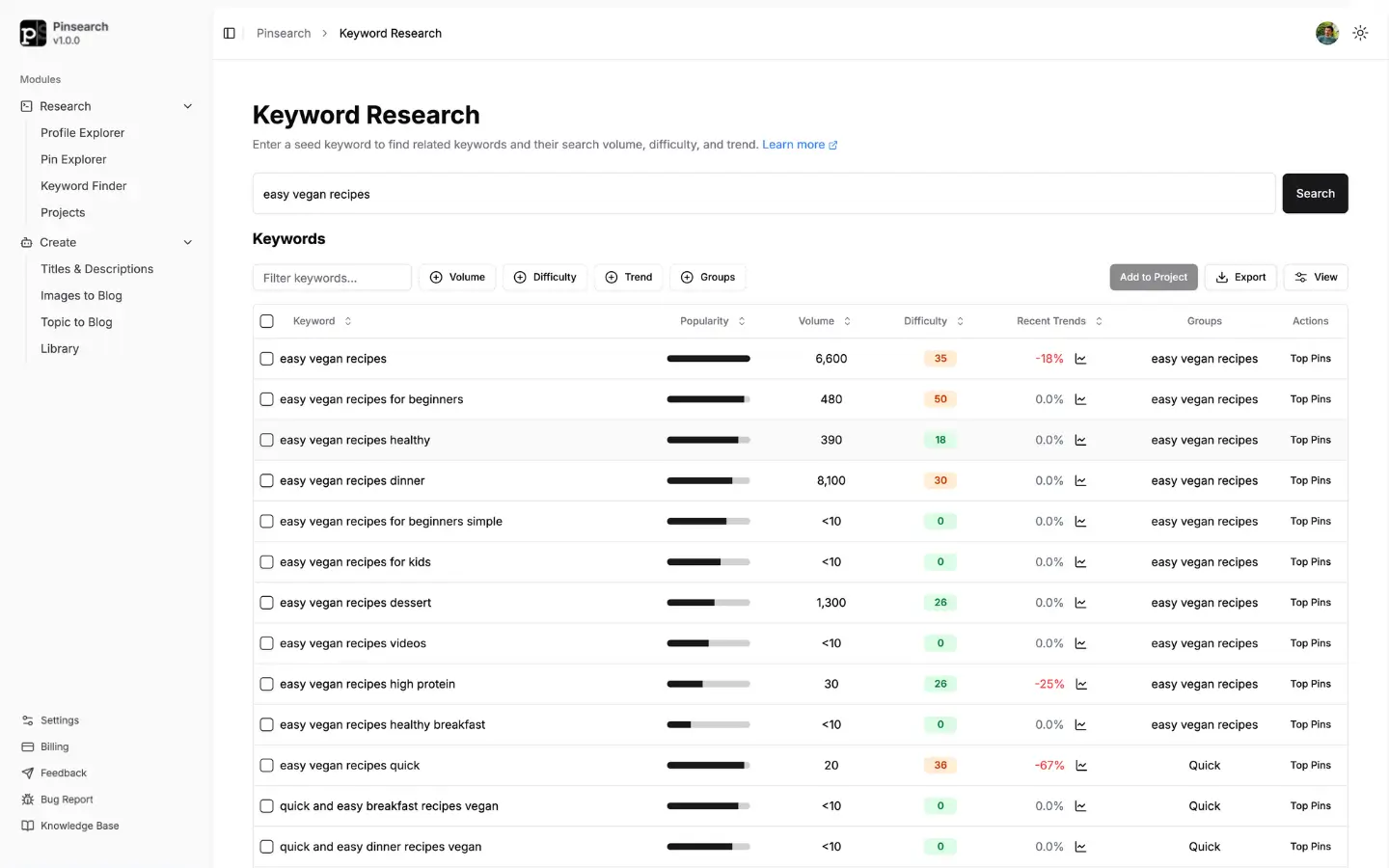
Pinsearch is the most natural “next step” for creators who want a Pinterest‑focused keyword tool that feels modern and easy to use. Instead of a desktop app, it runs entirely in your browser, so you can use it from any device and don’t have to worry about installations or updates.
The keyword research module is designed to feel familiar if you’ve ever used SEO tools. You type in a topic and get back real Pinterest keyword ideas with search volume estimates, difficulty scores, and simple trend visuals. That makes it much easier to decide which phrases are worth creating content for, rather than just collecting long lists of random keywords.
Pinsearch also pulls real search volumes from Pinterest for all the official annotations used by Pinterest. This gives you an unfair advantage while creating content. While other bloggers are guessing which keywords to include in their title/description, you will know exactly which high volume keyword to target.
Where Pinsearch really pulls ahead is organization. You can group research into Projects, save your favorite keyword sets, and keep everything neatly tied to specific blogs, products, clients, or campaigns. That alone saves a lot of “Where did I put that spreadsheet?” frustration.
Pinsearch also includes Profile Explorer and Pin Explorer for competitor and pin analysis. You can plug in a profile and see which topics and pins perform best, then use that as inspiration for your own content plan. It’s a more “connected” way of working than simply exporting CSV files and hoping you remember what they were for.
Pinsearch creator tools help you create content with AI in minutes instead of hours. You can convert your images into a ready-to-publish blog as well as create a fully ready blog with just a keyword. The content is high quality and can be published on your WordPress site in a single click via integration.
Compared to Pin Inspector, Pinsearch trades some of the ultra‑deep, technical data for better usability and workflow. If you’ve ever felt overwhelmed by too many columns and metrics, you’ll likely find Pinsearch more comfortable day‑to‑day.
Best for: Bloggers, small businesses, and agencies who want web‑based research, clean organization, and practical insights instead of raw data dumps.
2. Pinclicks
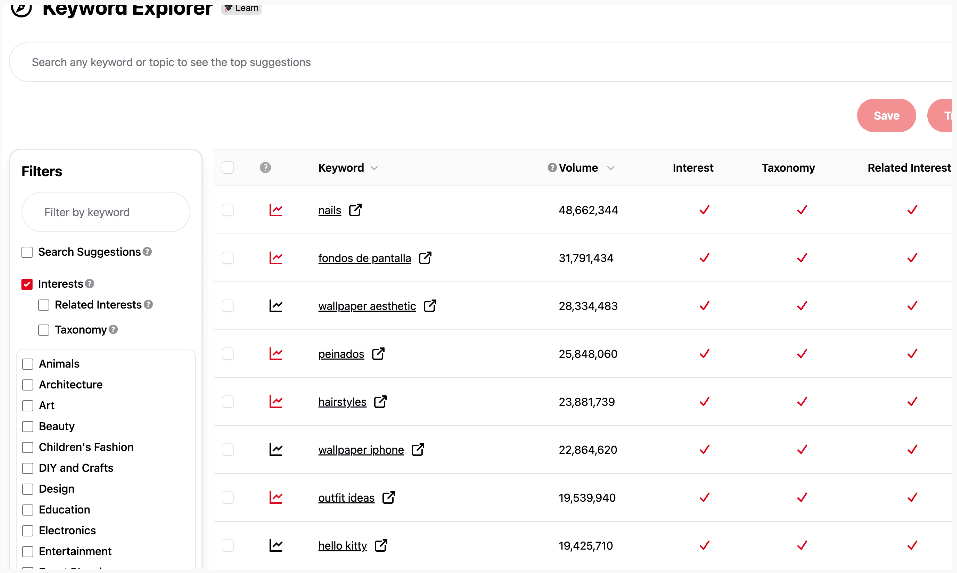
Pinclicks is a strong alternative if you want to go deeper into data than Pin Inspector and are happy to pay a monthly fee for advanced features. It’s built specifically for serious Pinterest SEO and offers a few standout capabilities.
The biggest one is keyword rank tracking. You can choose specific keywords and monitor where your pins show up in Pinterest search over time. That makes it much easier to see whether your SEO tweaks are working, which keywords are climbing, and which ones need more attention.
PinClicks also includes a huge database of Pinterest interest keywords and detailed pin metrics. When you research a keyword, you can see top pins, engagement levels, and a proprietary “Pin Score” that summarizes how strong each pin is. It’s very helpful if you like to reverse‑engineer what’s working in your niche.
Like Pinsearch, PinClicks is web‑based, so you can log in from anywhere. The interface is a bit more data‑heavy, so it can feel busier at first, but it’s powerful once you get used to it.
Compared to Pin Inspector, PinClicks is more focused on ongoing tracking and trend monitoring than one‑off deep research. You’re paying for fresh data and continuous insight, which can be worth it if Pinterest is a major traffic source for you.
Best for: Established bloggers, digital product sellers, and agencies that want rank tracking and are comfortable with a subscription for advanced data.
3. Tailwind
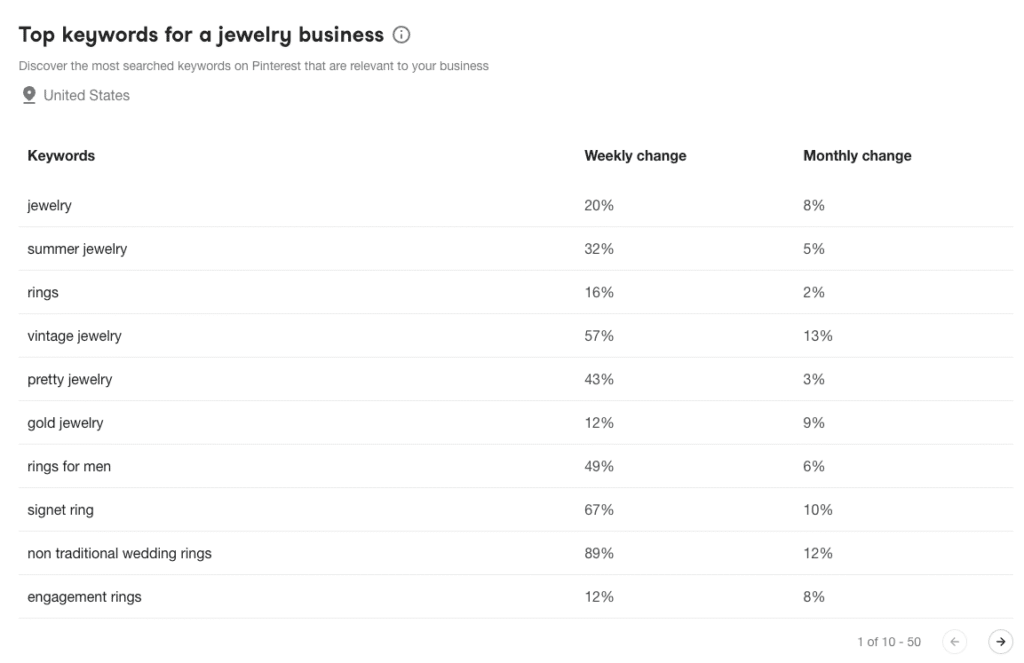
Tailwind is best known as a Pinterest scheduling tool, but it also includes several Pinterest SEO and keyword‑related features. If you’ve ever wanted “one place” to schedule pins, find keywords, and monitor performance, Tailwind is worth a look.
The SmartSchedule picks the best times to publish your pins based on audience behavior, which helps you stay consistent without constantly logging into Pinterest. On top of that, Tailwind offers a basic Pinterest keyword finder that suggests relevant terms based on your URL or topic.
You also get extras like Communities (groups where members share each other’s content), a board title generator, alt‑text suggestions, and an AI description writer. Together, these tools make it easier to move from “idea” to “published pin” quickly.
Compared to Pin Inspector, Tailwind is less about raw keyword data and more about workflow and automation. You won’t see the same level of detailed search volume or annotation data, but you will find it much easier to maintain a consistent posting schedule.
Best for: Creators who value scheduling and collaboration plus enough keyword support to stay on track, rather than deep research.
4. Keysearch
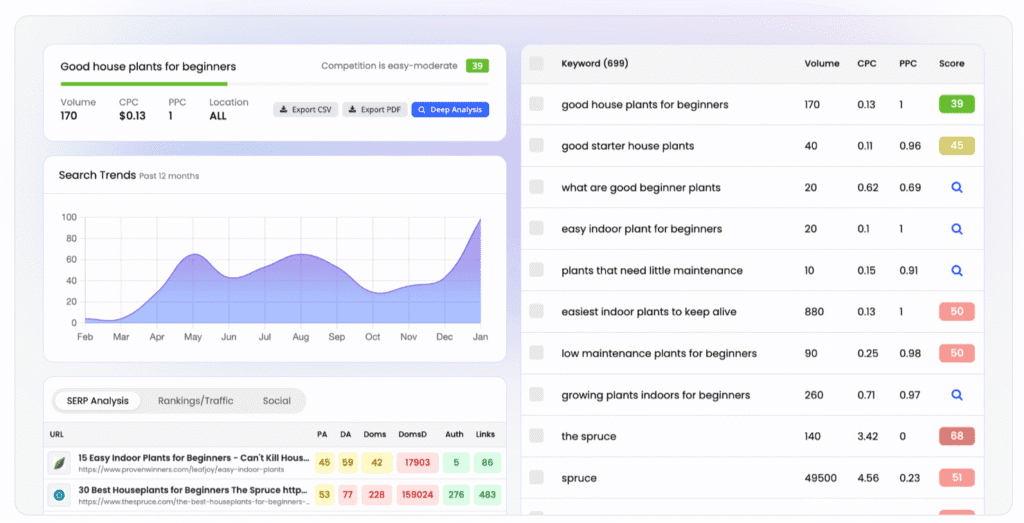
Keysearch is built primarily as a general SEO keyword research tool, but it includes a solid free Pinterest keyword finder that many bloggers appreciate. If you’re doing keyword research across your blog, website, and Pinterest, Keysearch can be a helpful all-in-one solution.
The free Pinterest Keyword Tool generates keyword suggestions based on Pinterest’s autocomplete data. You enter a starting phrase and get back related keywords, long-tail variations, and related searches. It’s straightforward and doesn’t require a paid subscription to use the Pinterest feature specifically.
If you upgrade to a paid Keysearch plan, you unlock additional metrics like search volume estimates, competition levels, and keyword difficulty scores. You also get access to keyword research for your blog and other platforms, so you’re not just limited to Pinterest data.
Keysearch’s main appeal is consolidation. If you’re a blogger who needs to research keywords for blog posts, YouTube, and Pinterest all in one place, it saves you from juggling multiple tools. The interface is clean and designed for people who aren’t technical.
Compared to Pin Inspector, Keysearch is much less Pinterest-specific. It treats Pinterest as one of several platforms, so you won’t find deep Pinterest features like annotation keywords, pin analytics, or profile exploration. It’s more of a "nice bonus" feature than the core strength of the tool.
Best for: Bloggers and content creators who do keyword research across multiple channels and want one tool to cover blog SEO, Pinterest, and maybe YouTube or other platforms without breaking the bank.
Pindodo (Chrome Extension)
Pindodo takes a lightweight approach as a browser extension for Chrome and Firefox. Rather than logging into a separate platform, you open the extension and quickly check keyword ideas and hashtags as you work.
It’s geared toward discovering keyword and hashtag suggestions, including some that aren’t obvious from Pinterest’s own suggestions. The tool also shows basic metrics like search volume and difficulty, so you can quickly decide whether a keyword is worth targeting.
Because it lives in your browser, Pindodo feels very accessible for non‑technical users. You don’t have to manage logins to separate dashboards or learn a complex interface.
On the flip side, it doesn’t offer deeper capabilities like competitor analysis, pin analytics, or project organization. It’s more of a “helper” for quick keyword checks than a full research suite.
Best for: Newer Pinterest creators and bloggers who want a low‑friction way to find better keywords and hashtags without diving into advanced tools right away.
Feature comparison (text‑only table)
Below is a simple, WordPress‑friendly table you can paste directly:
| Feature | Pinsearch | PinClicks | Tailwind | Keysearch | Pindodo |
|---|---|---|---|---|---|
| Pinterest keyword research | Yes | Yes | Yes | Yes | Yes |
| Search volume data | Yes | Yes | Basic | Yes | Yes |
| Keyword difficulty | Yes | No | No | Yes | Yes |
| Trending / seasonal view | Yes | Yes | Yes | No | No |
| Competitor / profile analysis | Yes | Yes | Limited | No | No |
| Rank tracking | No | Yes | No | No | No |
| Project / campaign organization | Yes | Basic | No | No | No |
| Pin analytics | Yes | Yes | Yes | No | No |
| Browser extension | No | No | No | No | Yes |
| Multi-platform keyword research | No | No | No | Yes | No |
| Content Creation | Yes | No | No | No | No |
Pricing comparison
Exact prices can change, so always double‑check the latest on each site, but here’s the general structure:
| Tool | Starting price | Payment model | Free trial | Best value for |
|---|---|---|---|---|
| Pinsearch | $9/month, $89/year | Subscription | 7 days | Active Pinterest marketers |
| PinClicks Pro | ||||
| PinClicks Plus | $29/month $49/month | Subscription | 5 days | Creators who want rank tracking |
| Tailwind | $17.99/month | Monthly | Yes | Users needing scheduling + keywords |
| Keysearch | $24/month | Subscription | Free tier | Multi-channel content creators |
| Pindodo | Not available | Subscription | 7 days | Beginners testing Pinterest SEO tools |
Final opinion
If you’re looking to move beyond Pin Inspector, here’s how to think about your choice:
- Pick Pinsearch if you want the most balanced alternative: web-based, easy to use, strong keyword data, and good organization for ongoing Pinterest marketing.
- Pick PinClicks if you’re data-driven and especially care about tracking where your pins rank over time.
- Pick Tailwind if scheduling and staying consistent with pinning matters more to you than deep keyword analysis.
- Pick Keysearch if you’re a blogger doing keyword research across your blog, Pinterest, and other channels and want one affordable tool to cover everything.
- Pick Pindodo if you’re newer to keyword tools and want something simple that lives right in your browser.
The "best" choice depends on your stage of business and how serious you are about Pinterest as a traffic source. If Pinterest is a major channel for you and you’re comfortable with web tools, Pinsearch is usually the easiest and safest place to start.
